
When scraping sites heavily protected by anti-bot systems, default headless browser automation can still fail even with IP rotation and real browser headers. This is because anti-bots analyze many signals during requests. They score TLS fingerprints, browser fingerprints, and many more behavioral patterns to determine whether your traffic appears automated or human-like.
Stealth browsers are built to pass those checks. In this article, you’ll learn what stealth browsers are and how they work. You’ll also see a comparison of eight open-source stealth browsers, including a comprehensive benchmark to determine which is best for web scraping.
Key Takeaways
- A stealth browser is a patched browser automation tool designed to bypass anti-bot measures by masking TLS fingerprints and core browser properties.
- Byparr emerged as the most reliable open-source option in our 2026 benchmarks with a 92.16% success rate, though it carries higher latency.
- FlareSolverr is the top choice for speed-to-success ratio, maintaining a 90.38% success rate with an average bypass time of only 15.21 seconds.
- Tools like Camoufox offer extreme fingerprint customization but are significantly slower (42.49s bypass time), showing that more stealth doesn't always lead to better results.
- Open-source tools are ideal for small- to medium-sized scraping tasks, but often struggle with fingerprint leakage and high infrastructure costs at enterprise scale.
- For >99.9% uptime without manual patching, a managed premium scraping solution is recommended to automatically handle evolving anti-bot updates.
Before we go into in-depth review of the tools, you might want a quick snapshot. The following table briefly describes all the stealth browsers we'll cover in this article.
| Tool | Description | Best For | Ideal Scale |
|---|---|---|---|
| Byparr | Self-hosted anti-bot bypass reverse proxy server with FlareSolverr-compatible HTTP API | Small- to medium-sized scraping jobs where bypassing the target is the priority, and you can tolerate higher latency in exchange for a higher success rate. | Moderate concurrency when you can afford a full browser per container and handle some operational overhead |
| FlareSolverr | Open-source proxy server that drives a headless browser behind a /v1 API |
Scraping Cloudflare-protected targets. An ideal tool when you need a moderate balance between success rate and speed. | Light, short-lived scraping tasks rather than large-scale or long-running projects |
| Camoufox | Anti-detect browser based on a customized Firefox build with a Playwright-style Python API | Targeted scraping of hard anti-bot pages in Python, where stealth and fingerprint control matter more than speed | Small to medium workloads with a limited number of Firefox-based stealth sessions, few concurrency, or where latency is not a drawback |
| Scrapling (StealthyFetcher) | Python scraping library with HTTP, Playwright, and Camoufox-based stealth fetchers | Scraping tasks where you need to bypass only a few anti-bot-protected targets | Small to medium mixed crawls. Its stealth mode doesn't scale well at high concurrency. Reserved it for protected URLs only |
| Pydoll | Async-first CDP-based Chromium automation library focused on anti-bot evasion | Async Chromium scraping with realistic interaction and helpers for Cloudflare Turnstile and reCAPTCHA v3 | Moderate parallel tabs in a single process before CPU and memory costs from real browsers become too high |
| Puppeteer Real Browser | Node.js browser automation library that starts a full Chrome binary via chrome-launcher and controls it through Puppeteer |
Short-lived Node.js scraping tasks where you already use Puppeteer and need CAPTCHA clicking support in a real Chrome window | Small runs with low concurrency. Each process runs a full Chrome instance, so the CPU, RAM, and display setup on Linux limit parallel sessions |
| SeleniumBase (UC Mode) | Python browser automation framework built on top of Selenium with a UC Mode that uses Undetected ChromeDriver | Selenium-based scraping projects that need helpers for Cloudflare Turnstile or similar checkbox CAPTCHAs | Small to medium runs where you can use headed Chrome and are ready to tune waits, retries, etc per target |
| Zendriver | Async-first Python CDP automation for real Chrome sessions, with profile and cookie reuse support | Python CDP-based scrapers that need real Chrome sessions and built-in profile or cookie reuse features | Moderate concurrency with several tabs per process until CPU and memory use from full Chromium sessions become the main bottleneck |
What Is a Stealth Browser?
A stealth browser is a browser automation setup designed to mimic a normal user session during anti-bot checks. It still uses a real browser engine through tools like Playwright, Puppeteer, or Selenium, but it hides the automation clues that headless browsers usually expose.
Under the hood, a stealth browser changes the signals that websites read to decide whether a request is human or automated. These signals include JavaScript properties that describe the browser and device, and how the page renders graphics in canvas or WebGL.
Stealth browsers also adjust network-level details such as HTTP header order and the Transport Layer Security (TLS) fingerprint. By aligning these values with the browser fingerprints emitted by real desktop sessions, a stealth browser gives automated runs a human-like browser fingerprint.
How Stealth Browsers Work
Stealth browsers coordinate what happens at the network level, inside the browser, and how pages are driven, rather than just changing request headers. They attach automation to a full browser engine so connection setup, HTTP/2 framing, and TLS details follow the same path as a real desktop browser.
Before loading a web page, the stealth layer modifies how the browser operates by using custom browser executables, modified drivers, custom scripts, or a combination of these. These changes help hide automation signals and help reduce the risk of anti-bot detection.
On top of that, many stealth setups help keep a consistent browser profile across multiple requests and reuse cookies and storage where appropriate. Depending on the patch level, they can also vary the timing of interactions, scrolling, and even cursor movements, so requests don't exhibit bot-like patterns. Libraries and plugins package this into a single "stealth" mode that wraps tools such as Playwright, Puppeteer, Selenium, or custom CDP clients so every navigation goes through the same evasion logic.
To see what stealth tools actually change during scraping, let's compare a plain headless session with a stealth plugin on BrowserLeaks’ fingerprinting test page. First, send a request to the test page using a plain Playwright script with no stealth applied:
# pip3 install playwright && playwright install chromium

import asyncio
from playwright.async_api import async_playwright

SIGNALS = {
    "navigator.webdriver":      "navigator.webdriver",
    "plugins count":            "navigator.plugins.length",
    "languages":                "JSON.stringify(navigator.languages)",
    "userAgent":                "navigator.userAgent",
    "outerWidth x outerHeight": "`${window.outerWidth}x${window.outerHeight}`",
    "Notification.permission":  "Notification.permission",
}

async def main():
    async with async_playwright() as p:
        browser = await p.chromium.launch(headless=True)
        page = await browser.new_page()
        await page.goto("https://browserleaks.com/javascript", wait_until="networkidle")

        print(f"{'Signal':<30} {'Value'}")
        for label, js in SIGNALS.items():
            value = await page.evaluate(f"() => String({js})")
            print(f"{label:<30} {value}")

        await browser.close()

asyncio.run(main())
When you run the code, the output is as follows:
Signal                         Value
navigator.webdriver            true
plugins count                  0
languages                      ["en-US"]
userAgent                      Mozilla/5.0 (Windows NT 10.0; Win64; x64) AppleWebKit/537.36 (KHTML, like Gecko) HeadlessChrome/145.0.7632.6 Safari/537.36
outerWidth x outerHeight       1280x720
Notification.permission        denied
Every obvious flag is visible here. navigator.webdriver is true, the plugin list is empty, and the User Agent contains HeadlessChrome. Any anti-bot system that reads these values will score the session as automated.
Let's now run the same code with Camoufox, a Playwright-based stealth browser wrapped around Firefox.
# pip install -U camoufox[geoip]
# Download the browser once:
#   Windows: camoufox fetch
#   macOS:   python3 -m camoufox fetch
#   Linux:   python -m camoufox fetch

from camoufox.sync_api import Camoufox

SIGNALS = {
    "navigator.webdriver":      "navigator.webdriver",
    "plugins count":            "navigator.plugins.length",
    "languages":                "JSON.stringify(navigator.languages)",
    "userAgent":                "navigator.userAgent",
    "outerWidth x outerHeight": "`${window.outerWidth}x${window.outerHeight}`",
    "Notification.permission":  "Notification.permission",
}

with Camoufox(headless=True) as browser:
    page = browser.new_page()
    page.goto("https://browserleaks.com/javascript", wait_until="networkidle")

    print(f"{'Signal':<30} {'Value'}")
    for label, js in SIGNALS.items():
        value = page.evaluate(f"() => String({js})")
        print(f"{label:<30} {value}")

    page.close()
Here is a sample output when you rerun the code.
Signal                         Value
navigator.webdriver            false
plugins count                  5
languages                      ["en-US","en"]
userAgent                      Mozilla/5.0 (X11; Linux x86_64; rv:135.0) Gecko/20100101 Firefox/135.0
outerWidth x outerHeight       1920x1048
Notification.permission        default
The same six signals now look like a normal desktop browser session: navigator.webdriver is false, plugins are present, and the User Agent no longer includes HeadlessChrome.
Benchmarking Open-source Stealth Browsers for Web Scraping
To find the most reliable open-source stealth browser for web scraping, we ran a controlled benchmark on eight tools: Byparr, FlareSolverr, Camoufox, Scrapling, Pydoll, Puppeteer Real Browser, SeleniumBase, and Zendriver. Each tool was tested on the Antibot Challenge page.
Tool Selection and Test Method
These eight tools weren’t picked at random. We drew on extensive sampling and past in-depth reviews to select eight open-source stealth browser tools to benchmark against the wider landscape.
The benchmark mixed "cold" runs, which started from a clean browser profile, and "warm" runs, which reused the same profile and cookies. We ran 100 iterations per tool sequentially and recorded whether each attempt passed the challenge and how long it took. We conducted the tests on a machine with 16 GB of RAM and a 2.60GHz processor.
Although different programming languages and browser automation tools can exhibit speed differences, we still included speed in our benchmarks because execution speed and anti-bot bypass success are critical for real-world web scraping. Ultimately, the best tool is one that balances reliability and performance, no matter the underlying technology or programming language.
The results were as follows:
| Tool | Language | Success Rate (%) | Bypass Time (s) |
|---|---|---|---|
| Byparr | Python | 92.16 | 18.28 |
| FlareSolverr | Python | 90.38 | 15.21 |
| Camoufox | Python | 88.58 | 42.49 |
| SeleniumBase | Python | 80.76 | 20.14 |
| Pydoll | Python | 78.76 | 28.87 |
| Zendriver | Python | 62.68 | 18.02 |
| Scrapling | Python | 58.03 | 29.16 |
| Puppeteer Real Browser | Node.js | 57.36 | 12.65 |
And here's a grahical presentation of the benchmark result:

The recorded success rates of these tools may change in future benchmarks, and their effectiveness can vary depending on the environment, such as local machines versus remote servers. A common drawback we've found with open-source stealth tools is that their success rate often degrades over time, since it’s difficult for maintainers to keep pace with frequent anti-bot security updates.
Without considering speed, Byparr would've emerged as the best open-source stealth browser in this test.
Balancing Bypass Reliability and Execution Speed
However, when we compare the success rate to bypass time, FlareSolverr clearly stands out as the most efficient option. It delivers a 90.38% success rate while averaging just 15.21 seconds per bypass.
On the other hand, Camoufox sits at the opposite end of the spectrum. With a 42.49-second bypass time, the slowest in the group, it shows that heavy, deep spoofing does not necessarily translate into meaningfully higher success rates (88.58%). In practice, more streamlined, dedicated stealth solutions achieve comparable or even better results with far less latency.
This disparity suggests that FlareSolverr likely optimizes for just-enough stealth to bypass common anti-bot signatures, whereas Camoufox may be over-engineering the browser environment.
"In high-volume scraping, a 27-second difference in bypass time (Camoufox vs. FlareSolverr) adds up to massive infrastructure costs and slower data delivery cycles, making the efficiency score a more critical KPI than success rate alone," says Jonathan Nebot, Senior Software Engineer for Scraping Browser at ZenRows.
This benchmark only covers Cloudflare-protected websites. The open-source stealth tools examined here may perform differently against other anti-bot systems, such as Akamai, PerimeterX, DataDome, Incapsula, etc.
Now, let's discuss these 8 stealth browsers in detail.
Top 8 Open-Source Stealth Browsers and Tools to Bypass Anti-bots During Web Scraping
In this section, you’ll see how the top eight stealth browsers and tools stack up: their pros, cons, code samples, and where each one works best.
1. Byparr

Byparr is a self-hosted anti-bot bypass server that exposes an HTTP API compatible with FlareSolverr’s /v1 endpoint. According to Byparr’s official GitHub repository, the tool runs a Camoufox-based Firefox automation stack behind a FastAPI server and returns the page HTML, cookies, headers, and User Agent data that your scraper can reuse.
The Byparr team also notes that the tool doesn't guarantee a successful bypass. This warning supports our view of the unpredictable and transient nature of stealth solutions.
In our benchmark, Byparr recorded a 92.16% success rate with an average bypass time of 18.28s. While Byparr delivered a good Cloudflare bypass success rate, we found its speed was not as competitive as some other stealth tools, such as FlareSolverr.
👍Pros
- It's a good alternative to FlareSolverr, so existing FlareSolverr integrations in tools like Prowlarr, Sonarr, or custom scrapers can usually be switched over by changing only the endpoint URL.
- It drives a real Firefox browser through Camoufox, so JavaScript runs in a full browser environment.
- It has a good anti-bot bypass success rate, especially on Cloudflare-protected pages.
- It supports session and fingerprint reuse.
- It's actively maintained, which is important when anti-bot systems keep changing.
- It supports Docker, Docker Compose, and local runs using the uv Python package manager, which makes it easy to set up small scraping servers.
👎Cons
- Byparr is primarily tuned and used for Cloudflare challenges, so it may not perform as well with other anti-bot providers.
- Each instance runs a full browser, which requires at least 512 MB of RAM per container, and this quickly adds up to high memory usage at higher concurrency.
- You need to run and monitor the service yourself, including Docker health, logs, and upgrades, which adds operational overhead.
How to Use Byparr
Here is a Byparr sample code that targets the Antibot Challenge page.
import requests
from pathlib import Path

# byparr server and test target
BYPARR_URL = "http://localhost:8191/v1"
TARGET_URL = "https://www.scrapingcourse.com/antibot-challenge"

# build the JSON body for Byparr's /v1 endpoint
payload = {
    "cmd": "request.get",
    "url": TARGET_URL,
    "maxTimeout": 120000,
}

# set basic headers for the api call
headers = {"Content-Type": "application/json"}

# send the request to Byparr and parse the solution
resp = requests.post(BYPARR_URL, headers=headers, json=payload, timeout=130)
data = resp.json()
solution = data.get("solution", {}) or {}
html = solution.get("response", "") or ""

# write the HTML body to a local file
out_path = Path("scrapingcourse_antibot_byparr.html")
out_path.write_text(html, encoding="utf-8")
print(f"saved html to: {out_path.name}")
This script posts a FlareSolverr-style payload to Byparr’s /v1 endpoint, reads the HTML from the solution.response field, and saves it to disk.
Best For
Byparr is useful for small to medium Cloudflare-protected scraping jobs, but it's not a good choice for high-concurrency tasks or non-Cloudflare targets.
To learn more, read our article on web scraping with Byparr.
2. FlareSolverr
FlareSolverr is an open-source proxy server built to bypass Cloudflare and DDoS-Guard by driving the Chrome browser on your behalf. It starts a proxy, waits for requests on the /v1 endpoint, then launches a Chrome browser through Selenium and Undetected ChromeDriver, waits until the Cloudflare challenge is solved, and returns the page HTML and cookies for your scraper to reuse.
In our benchmark, FlareSolverr recorded a 90.38% success rate with an average bypass time of 15.21s. It delivered a good success rate while keeping bypass time relatively low compared to other tools we tested.
👍Pros
- It runs headless Chrome through Selenium and Undetected ChromeDriver, which hides common headless flags and tweaks browser fingerprints to bypass Cloudflare checks.
- It's easy to deploy with Docker and Docker Compose, and there are community Helm charts and images for common setups.
- Being older than Byparr, FlareSolverr has more mature documentation and third-party guides, which makes integration and debugging easier.
- It has a good success rate in bypassing Cloudflare-protected targets.
👎Cons
- FlareSolverr doesn't support authenticated proxies on a per-request basis, so rotating authenticated proxies requires creating new sessions to switch IPs.
- Anti-bot patches can break FlareSolverr suddenly, so you can’t treat it as a set-and-forget component.
- FlareSolverr can hang or freeze after long runs, and you may need to restart the service to clear the stuck browser state.
How to Use FlareSolverr
Here’s a basic FlareSolverr code example that targets the Antibot Challenge page through a local instance.
# install: pip3 install requests
import requests

# FlareSolverr api endpoint
url = "http://localhost:8191/v1"

# json headers for the api call
headers = {"Content-Type": "application/json"}

# body describing the target page and timeout
data = {
    "cmd": "request.get",
    "url": "https://www.scrapingcourse.com/antibot-challenge",
    "maxTimeout": 60000,
}

# send the request to FlareSolverr
response = requests.post(url, headers=headers, json=data)

# print the structured response from FlareSolverr
content = response.json()
print(content)
This script sends a request.get command to FlareSolverr’s /v1 endpoint for the Antibot challenge page and prints the JSON it returns, including the solved HTML and cookies you’d reuse in follow-up scraping requests.
Best For
FlareSolverr is useful for low-volume Cloudflare scraping tasks. It’s a weak choice for larger or long-running projects. We also found that it often breaks after Cloudflare updates, making it an unreliable choice for sustainability.
To learn more, read our comprehensive guide on FlareSolverr.
3. Camoufox
Camoufox is an open-source anti-detect browser based on a customized Firefox build. It's designed to evade modern bot detection and exposes Playwright's automation API. Camoufox lets you spin up a browser, open the pages, and interact with them using familiar Playwright methods like new_page() and goto().
According to Camoufox’s official documentation, it modifies device and fingerprint data in Firefox’s C++ layer. It then rotates realistic BrowserForge fingerprints so automated sessions blend into normal user traffic rather than look like patched headless runs.
In our benchmark, Camoufox recorded an 88.58% success rate with an average bypass time of 42.49s. While the success rate was strong, the bypass time was high compared to most of the tools we tested. So, it can be a poor fit when low latency matters.
👍Pros
- It changes fingerprint values within the Firefox engine before JavaScript runs, making simple anti-bot fingerprint checks less effective at detecting automation.
- It can switch between realistic browser profiles, where OS, screen size, languages, fonts, and GPU details are drawn from real-world patterns rather than random values.
- The Python API follows Playwright’s structure, so most Playwright-style scrapers only need small changes in imports and browser setup to use Camoufox.
- It supports persistent contexts and user data folders, which helps when you need to reuse sessions across logins, dashboards, and anti-bot challenge pages.
- Camoufox offers optional humanization features, such as human-like mouse movement and scrolling, which help with targets that log basic interaction paths and timing.
👎Cons
- According to Camoufox’s official GitHub repository, there has been a one-year maintenance gap, so you need to watch new releases closely if you depend on it for tough targets.
- Camoufox is limited to Firefox, so it’s not a good fit for emulating Chrome or another Chromium-based browser.
- Running a custom Firefox build with fingerprint logic is heavy on CPU, memory, and disk, which makes high-concurrency setups harder to run and monitor.
How to Use Camoufox
Here is a minimal Camoufox example that targets the ScrapingCourse anti-bot challenge page.
# install: pip3 install -U camoufox[geoip]

import time
from camoufox.sync_api import Camoufox

with Camoufox(
    headless=False,
    humanize=True,
    os="windows",
    persistent_context=True,
    user_data_dir="user_data",
) as browser:
    # open the anti-bot challenge page
    page = browser.new_page()
    page.goto("https://www.scrapingcourse.com/antibot-challenge/")

    # give the challenge time to render and run checks
    time.sleep(10)
    page.wait_for_timeout(20000)

    page.close()
This script starts a Camoufox browser session with human-like behavior enabled, opens the anti-bot challenge page, waits for the challenge logic to run, and then closes the page after the session has had time to settle.
Best For
Camoufox works best for targeted scraping on hard anti-bot pages in Python, where stealth and fingerprint control matter more than speed. It's not a good choice for high-volume or low-latency scraping, because running many full Firefox instances is expensive and slow.
Read our article on web scraping with Camoufox to learn more.
4. Scrapling
Scrapling is an open-source Python scraping library with an adaptive HTML parser. It supports element tracking, which saves an element’s properties and then tries to find the same element again after a site change using similarity matching. It can reduce breakages caused by small DOM shifts, such as renamed classes or moved nodes, but it won’t survive a full redesign without selector updates.
Scrapling also includes several backends for HTTP, full browsers, and a stealth browser. Its StealthyFetcher adds a stealth layer for handling Cloudflare Turnstile and related interstitial checks.
In our benchmark, Scrapling recorded a 58.03% success rate with an average bypass time of 29.16s. That bypass rate showed that Scrapling isn't a good choice for critical scraping tasks that require a consistently high bypass rate.
👍Pros
- It supports static standard requests, stealth mode, and dynamic page fetching.
- It includes an adaptive parser with smart element tracking that can relocate saved elements after minor DOM changes.
- Stealth mode can automatically solve Cloudflare Turnstile and interstitial challenges.
- It ships with sessions, proxy rotation, and a spider API, so you can keep one stealth session for protected pages and use cheaper HTTP fetchers for everything else in the same crawl.
👎Cons
- Full stealth executions still require a real browser under the hood, so stealth mode is heavier than standard and dynamic requests combined, as it consumes more CPU and RAM at higher concurrency.
- Efficiency-enhancing features have been removed in the recent version, so you get fewer efficiency-tuning options than before.
- Although closed, a GitHub issue hints that Scrapling's stealth mode can hang for a long time when attempting to solve a challenge.
How to Use Scrapling
Here’s a minimal Scrapling code sample that routes the ScrapingCourse Antibot challenge page through StealthyFetcher.
# install: pip3 install "scrapling[all]"

from pathlib import Path
from scrapling.fetchers import StealthyFetcher

url = "https://www.scrapingcourse.com/antibot-challenge"

# create a stealth fetcher instance
fetcher = StealthyFetcher()

# fetch the protected page with stealth mode enabled
response = fetcher.get(url, solve_cloudflare=True)

# extract the final HTML after the challenge
html = response.text

# save the HTML body for inspection
out_path = Path("scrapingcourse_cloudflare_scrapling.html")
out_path.write_text(html, encoding="utf-8")
print(f"saved html to: {out_path.name}")
This script uses StealthyFetcher to open the Antibot challenge page, uses the stealth backend to handle Turnstile and related checks, then saves the returned HTML.
Best For
Scrapling’s StealthyFetcher is best when you want one Python stack that uses HTTP for most pages and a stealth browser only for a few hard, protected pages, but it’s not ideal if your tasks need very high concurrency.
To learn more, read our full tutorial on web scraping with Scrapling.
5. Pydoll
Pydoll is an async-first Python browser automation library that drives Chromium-based browsers directly over the Chrome DevTools Protocol (CDP), without any WebDriver layer. It focuses on anti-bot evasion and high-performance scraping, with realistic interactions and helpers for Cloudflare Turnstile and reCAPTCHA v3.
In our benchmark, Pydoll recorded a 78.76% success rate with an average bypass time of 28.87s. While it delivered a decent bypass success rate in our tests, its speed was not as competitive as some other stealth browsers.
👍Pros
- It uses the (CDP) for control, avoiding the need to install WebDriver binaries and the risk of version mismatches.
- It simulates human-like behavior, such as smooth mouse movement, typing, and scrolling, helping avoid simple behavior checks on protected sites.
- The async API lets you run multiple tabs concurrently within a single process, which is useful when you want to scrape several anti-bot-protected pages in parallel without blocking calls.
👎Cons
- Some features, such as CAPTCHA handling, don't always work, and you may need to plug in services like CapSolver or maintain your own bypass logic for tougher sites.
- It still runs real browsers, so heavy concurrency can become memory-intensive, increasing infrastructure cost.
- Its headless mode is often blocked by anti-bot vendors like DataDome.
How to Use Pydoll
Here is a code sample that uses Pydoll to target the ScrapingCourse anti-bot challenge page.
# install: pip install pydoll-python

import asyncio
from pathlib import Path

from pydoll.browser.chromium import Chrome

async def main():
    async with Chrome() as browser:
        tab = await browser.start()

        # open the anti-bot challenge page
        await tab.go_to("https://www.scrapingcourse.com/antibot-challenge")

        # wait a bit so javascript and anti-bot checks can run
        await asyncio.sleep(10)

        # grab the final html from the page
        html = await tab.execute_script(
            "return document.documentElement.outerHTML"
        )

        out_path = Path("scrapingcourse_antibot_pydoll.html")
        out_path.write_text(html, encoding="utf-8")
        print(f"saved html to: {out_path.name}")

asyncio.run(main())
The code above attempts to bypass the anti-bot challenge page's anti-bot systems and returns the final HTML.
Best For
Pydoll is a good fit when you want async Chromium sessions that keep decent speed at moderate concurrency, but it starts to slow down and burn CPU once you push into very high parallel browser counts.
To learn more, read our article on how to scrape with Pydoll to bypass anti-bots
6. Puppeteer Real Browser

Puppeteer Real Browser is a Node.js browser automation library that uses a Chrome instance. It then connects Puppeteer to the running browser, rather than using Puppeteer’s default launch path.
Under the hood, it uses rebrowser-puppeteer-core to reduce common automation leaks. It also bundles helpers like Ghost Cursor, which simulates human-like mouse movement and timing when clicking on page elements, such as Cloudflare Turnstile CAPTCHA.
In our benchmark, Puppeteer Real Browser recorded a 57.36% success rate with an average bypass time of 12.65s. That result suggests it can be quick on successful runs, but it’s not reliable when you require high accuracy. We ran it in GUI mode because it was most stable with headless: false.
👍Pros
- It can handle Cloudflare Turnstile by auto-clicking the widget when
turnstile: trueis enabled. - It includes built-in support for running headful sessions on Linux via Xvfb (X virtual framebuffer).
- It includes
ghost-cursorfor human-like mouse movement and click timing.
👎Cons
- The maintainer has announced it's no longer actively maintained, so future anti-bot changes can break it without fixes.
- Headful mode on Linux requires Xvfb and additional display configuration, adding setup and monitoring overhead on servers.
- It’s built around full Chrome rather than a lightweight engine, so CPU and memory costs grow quickly as you add more concurrent sessions.
How to Use Puppeteer Real Browser
Here’s a minimal Puppeteer Real Browser example that targets the ScrapingCourse Antibot Challenge page and prints the final HTML.
// install: npm install puppeteer-real-browser

const { connect } = require("puppeteer-real-browser");

async function scraper() {
  // Start a visible Chrome session and attach Puppeteer to it.
  const { browser, page } = await connect({
    headless: false,
    connectOption: { defaultViewport: null },
    args: ["--start-maximized"],
    turnstile: true,
  });

  // Open the target page and wait for network activity to settle.
  await page.goto("https://www.scrapingcourse.com/antibot-challenge/", {
    waitUntil: "networkidle2",
  });

  // Print the final HTML for inspection.
  const html = await page.content();
  console.log(html);

  await browser.close();
}

scraper().catch((err) => {
  console.error(err);
  process.exit(1);
});
Best For
Puppeteer Real Browser is a good fit for short-lived Node.js scraping scripts when you already use Puppeteer. But it’s a weak choice when you need a consistently high anti-bot success rate.
To learn more, read our guide on Puppeteer Real Browser.
7. SeleniumBase
SeleniumBase is a Python browser automation framework built on top of Selenium. It has a UC Mode that integrates Undetected ChromeDriver for stealthier Chrome sessions. UC Mode adds special uc_* methods for navigation, reconnect logic, and GUI-level interaction helpers such as uc_gui_click_captcha(), which can click Cloudflare Turnstile or Google reCAPTCHA widgets when present.
In our benchmark, SeleniumBase (UC mode) recorded an 80.76% success rate with an average bypass time of 20.14s. We ran it in GUI mode with uc=True because the UC Mode documentation explicitly warns that real headless runs are more detectable and recommends headed UC for stealth.
👍Pros
- SeleniumBase ships with UC mode built in, so you get an Undetected ChromeDriver setup without wiring a third-party library yourself.
- It bundles its own driver manager, which downloads and keeps ChromeDriver in sync with the installed version of Chrome on your machine.
- UC mode adds reconnect helpers, which reopen the page and attach later to reduce simple first-load detection.
- It includes a GUI CAPTCHA helper that can locate and click Cloudflare Turnstile and similar checkbox widgets when they appear.
👎Cons
- UC mode only targets Chrome, so there is no stealth support for Firefox, Edge, or other browsers.
- CAPTCHA helpers rely on GUI interaction, so they are not available in headless environments.
- Getting good results often requires tuning reconnect timing, waits, and retries per target, so UC mode isn’t a one-time task.
- The UC mode is easily detected by anti-bots while running in headless mode.
How to Use SeleniumBase
Here is a SeleniumBase UC mode code example that targets the ScrapingCourse Antibot Challenge page.
# install: pip install seleniumbase
from seleniumbase import Driver

# Create a Chrome driver with UC Mode enabled
driver = Driver(uc=True)

# Target page for UC Mode testing
url = "https://www.scrapingcourse.com/antibot-challenge"

# Open the page using UC reconnect logic to reduce initial detection
driver.uc_open_with_reconnect(url, reconnect_time=4)

# Let the UC helper try to click any visible CAPTCHA widget
driver.uc_gui_click_captcha()

# Give the page time to update after checks and interactions
driver.sleep(10)

# Capture the current HTML source seen by the browser
page_html = driver.get_page_source()
print(page_html)

# Shut down the browser session cleanly
driver.quit()
Best For
SeleniumBase in UC mode is a good choice when you already use Selenium or SeleniumBase itself for browser automation, or you're testing and need stealthier sessions. It’s not a good fit if your scraping needs can’t wait for UC mode and undetected-chromedriver to catch up every time anti-bot systems change.
Read our comprehensive tutorial on scraping with SeleniumBase to learn more.
8. Zendriver

Zendriver is an async-first browser automation library in Python that controls a real Chrome browser via the Chrome DevTools Protocol. For stealth, it keeps WebDriver undetectable, uses the same CDP channel as DevTools, and patches fingerprinting flags like WebRTC, WebGL, and more to cut down on common bot signals.
In our benchmark, Zendriver recorded a 62.68% success rate with an average bypass time of 18.02s. That put it behind top performers like Byparr and FlareSolverr in reliability, even though its solve time sat within a similar range.
👍Pros
- It uses CDP instead of Selenium WebDriver, which avoids classic WebDriver signals that many anti-bot systems check for.
- It's Async-first API makes it easier to run multiple tabs concurrently from a single event loop.
- Zendriver includes built-in support for persistent profiles and cookie export/import, so you can carry session state across runs when needed.
- It ships with Docker support and images that can run a real, GPU-accelerated browser instead of a minimal headless build.
👎Cons
- It still depends heavily on IP reputation and proxy quality, so a real browser session alone is not enough to avoid blocks on aggressive targets.
- Running many full Chromium instances increases CPU and memory usage, which limits how far you can push concurrency on a single host.
- It's tied to CDP-capable Chromium builds, so it's not a fit when you need to emulate non-Chromium browsers.
- You must run and maintain the browser and Docker stack yourself, including restarts, updates, and monitoring, which adds operational overhead at scale.
How to Use Zendriver
Here is a minimal Zendriver example that targets the ScrapingCourse Antibot Challenge page and saves a screenshot.
# install: pip3 install zendriver
import asyncio
import zendriver as zd

async def main() -> None:
    # start a new browser session
    browser = await zd.start()

    # open the anti-bot challenge page
    page = await browser.get("https://www.scrapingcourse.com/antibot-challenge")

    # give scripts and anti-bot checks time to run
    await page.wait(10)

    # capture a screenshot for inspection
    await page.save_screenshot("scrapingcourse_zendriver.png")
    print("saved screenshot to: scrapingcourse_zendriver.png")

    # close the browser session
    await browser.stop()

if __name__ == "__main__":
    asyncio.run(main())
Best For
Zendriver is best when you need moderate concurrency and can accept losing some data because a portion of runs will still be blocked by anti-bots. However, it's not a good choice for pipelines where missing records are not acceptable, such as competitor tracking.
To learn more, read our guide on using Zendrive for web scraping.
Common Limitations of Open-Source Stealth Browsers
Over the years of using and testing these open-source stealth tools on real targets, we've found a few recurring limitations across all of them.
- Scalability issue: Open-source stealth browsers work well on a small scale, then start failing intermittently as traffic increases, more sessions are added, or the anti-bot vendor ships an update. What passed yesterday can return error 403, loops, or empty HTML today with no code change on your side.
- Memory-intensive: Self-hosted stealth browsers also build up latency and degrade system performance. Every bypass run requires a full browser instance. Response times stretch out, and CPU and RAM usage rise as you increase concurrency. The more you scale, the more time you spend nursing containers, restarting stuck browsers, and watching resource dashboards instead of just consuming data, says Jonathan Nebot, Senior Software Engineer at ZenRows.
- Fingerprint leakages: Open-source stealth browsers and tools still leak bot-like fingerprints despite being patched. In our tests, we discovered that some stealth browser instances use outdated browser versions, odd screen-size combinations, old fonts, mismatched request headers, and regular timing patterns. These leaking signals eventually expose the tools as automated, leading to random blocks during scraping.
To scrape reliably at scale, you need a managed scraping solution that runs the browser and proxy infrastructure for you. It should also adapt as anti-bot systems evolve, rather than forcing you to keep tuning and patching self-hosted tools.
Managed Solution to Bypass All Anti-bot Measures
Managed scraping solutions handle browser, proxy, infrastructure, and anti-bot bypass for you. A good example is the ZenRows Scraping Browser. It runs cloud-hosted browser instances behind a remote browser API, backed by over 55 million residential IPs in 190+ countries, with 99.9% uptime and 99.93% success rate. This significantly reduces latency and infrastructure overhead, as it takes the weight of running instances off your local machine.
If you already use Puppeteer or Playwright, integration is a one-line change. Instead of connecting to a local Chrome instance, you point your client to the Scraping Browser URL.
wss://browser.zenrows.com?apikey=YOUR_ZENROWS_API_KEY
From there, you keep the same automation code: navigate pages, click, scroll, and wait for dynamic content. The Scraping Browser handles JavaScript-heavy sites, single-page apps, user interactions, geolocation targeting, and automatic IP rotation under the hood, so you don’t juggle proxy lists or custom stealth patches.
To use it, sign up for Zenrows, then go to the Scraping Browser playground and choose your preferred client (e.g., Puppeteer).
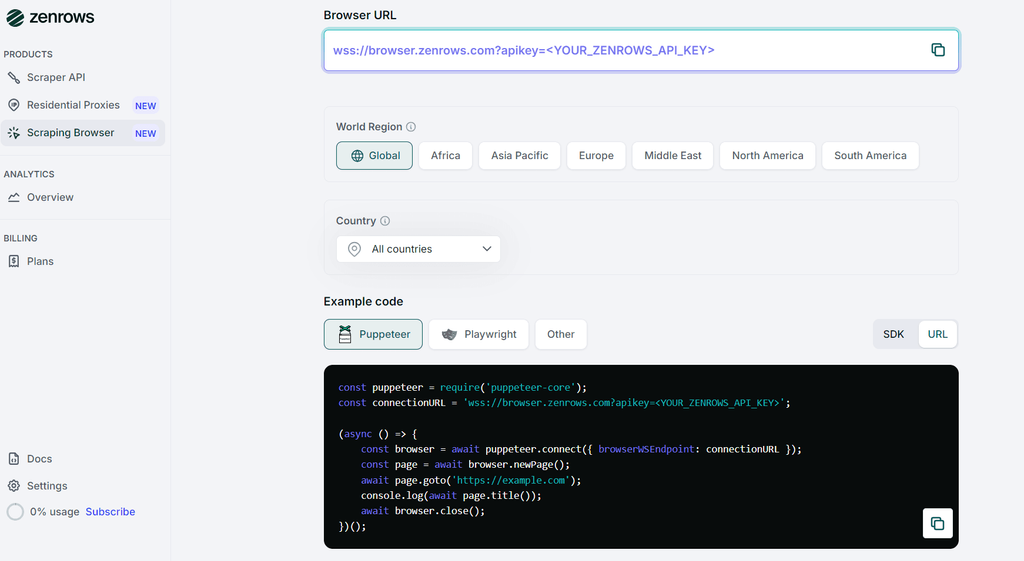
Then select the connection mode as URL and copy the generated code.
// npm install puppeteer-core

const puppeteer = require("puppeteer-core");
const connectionURL =
  "wss://browser.zenrows.com?apikey=<YOUR_ZENROWS_API_KEY>";

(async () => {
  const browser = await puppeteer.connect({
    browserWSEndpoint: connectionURL,
  });

  const page = await browser.newPage();
  await page.goto("https://example.com");
  console.log(await page.title());

  await browser.close();
})();
To adapt the code to your target, replace https://example.com with your own URL. Let's test it using the Antibot Challenge page.
// install: npm install puppeteer-core

const puppeteer = require("puppeteer-core");
const connectionURL =
  "wss://browser.zenrows.com?apikey=YOUR_ZENROWS_API_KEY";

(async () => {
  const browser = await puppeteer.connect({
    browserWSEndpoint: connectionURL,
  });

  const page = await browser.newPage();
  await page.goto("https://www.scrapingcourse.com/antibot-challenge");
  console.log(await page.title());

  await browser.close();
})();
When you run the code, the output is as follows:
<html lang="en">
<head>
  <!-- ... -->
  <title>Antibot Challenge - ScrapingCourse.com</title>
  <!-- ... -->
</head>
<body>
  <!-- ... -->
  <h2>
    You bypassed the Antibot challenge! :D
  </h2>
  <!-- other content omitted for brevity -->
</body>
</html>
Congratulations 🎉 You’ve bypassed all anti-bot checks and scraped the anti-bot challenge page using the ZenRows Scraping Browser.
Conclusion
In this article, you’ve learned what stealth browsers are, how anti-bot systems score your traffic, and how the main open-source options stack up in real benchmarks. You’ve also seen where self-hosted stealth setups break as you scale, from sudden blocks to higher latency and fingerprint drift.
If you want scraping that stays reliable as sites and anti-bots change, a managed solution like the ZenRows Scraping Browser is the best option.
Try ZenRows for free now or speak with sales!
Frequent Questions
Can a stealth browser guarantee that you won't get blocked by anti-bots?
Open-source stealth browsers can still leak small fingerprint signals, and they don’t fix bad IPs. If you use proxies with a poor reputation, anti-bot systems can block you even when using a stealth browser. If you want high reliability, use a managed solution like the ZenRows Scraping Browser.
When should you move from open-source stealth tools to a managed solution?
Open-source tools are good for experimenting, small-scale scraping, or when you can tolerate breakages. Once you depend on scraping for production workloads or are scraping at scale, a managed solution is a better fit.
How do you know when a stealth setup is starting to fail?
To know that a stealth browser setup is failing, watch for rising challenge rates, more 403/5xx errors, or longer solve times on the same targets. Those are early signs that anti-bot checks changed, and it may be time to retune your stack or move to a managed solution like ZenRows' scraping browser.